
Manage Access and Invite Users
How Owners and Admins add people to a company or project without exposing the full platform user list.
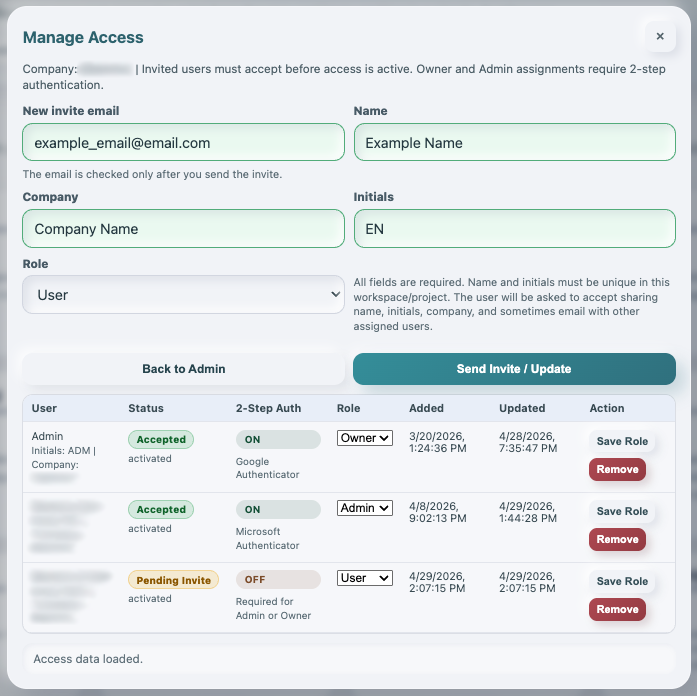
Manage Access is where Owners and Admins add people to a company or project and assign a role.
Platform admins can still choose from the full platform user list for support and administration.
Company and project Owners/Admins do not see that platform-wide email list. They see the existing members for the selected company or project, including their email inside that context, then use New invite email to invite another registered WorkStudio user.
When an invite is sent, WorkStudio checks whether that email already belongs to an account.
If the email does not exist, the invite is not created and the admin sees a warning. Only 3 wrong invite emails are allowed per hour. After that, inviting is paused for 1 hour to reduce email guessing and abuse.
Every member assignment requires Name, Company, and Initials. Name and initials must be unique inside the selected company or project because those values are visible in collaborative fields such as the TableStudio user column.
To update an existing member, click Edit Details on their row, change Name, Company, Initials, or Role in the form above the list, then click Send Invite / Save Details.
Company Owners and Admins inherently may switch a supported AI run from Standard AI to Advanced AI. They can grant the Use Advanced AI right to selected users from Rights. That grant permits Standard/Advanced selection only; it does not permit Platform AI or GPT-5.6 Sol, which remain restricted to platform administrators.
Status colors in Manage Access are:
Acceptedin greenPending Invitein orangeRejected,Reported, orCanceledin red
Rejected invitations, reported invitations, and wrong invite emails are flagged in audit and monthly review reports.
Platform admins can review reported invites and wrong invite-email attempts from Admin > Users > Invite Reports. Context admins can review member-specific events in the Rights Audit Trail.
Related: Invitation Messages and Approvals, My Account in WorkStudio, AI Credits and Upload Limits, Column Type: User.
These account and context assignments also matter when working with Records. Creating a Person or Company record, or adding a Relation, does not invite someone or grant access. Manage membership here and check Save Records and Control Access for the collection workflow.
Manage Access without exposing all platform emails
Owners and Admins invite by email and review member status. Platform admins can still use the wider platform-user tools.
Enable JavaScript to use reading progress and usefulness ratings.