
Column Type: User
Assign one or more project/company users from the current context while showing only initials in the cell.
A user column is used when a table row needs one or more responsible people from the current company or project context.
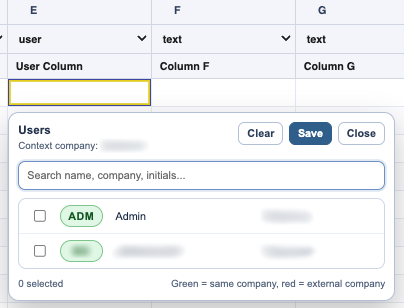
When you click a user cell, TableStudio opens a picker with the users assigned to that context.
The picker shows the profile data that users accepted for collaboration: name, company, and initials. Email is intentionally not shown in the picker.
Users from the same company as the current context are shown in green. Users from another company are shown in red so external assignments are easy to notice.
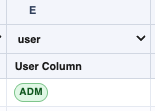
The cell itself stays compact and stores/displays the selected users by initials.
This column type is useful in normal TableStudio tables and in TimeLine files where hidden or visible assignment columns can later be shared with TaskBoard.
If you cannot see someone in the picker, check that they accepted the workspace/project invitation. Pending, rejected, reported, or canceled users are not active context users.
Related: Manage Access and Invite Users, Invitation Messages and Approvals, TableStudio Column Types, TimeLine.
Assign people without widening the table
The picker can show names and companies, while the grid keeps the cell compact by showing initials.
User initials stay compact in the cell
The cell shows initials instead of long names, with context-aware color so assignments stay readable.
Pick users from the current context
The user picker lists people assigned to the active company or project context without showing platform email addresses.
Enable JavaScript to use reading progress and usefulness ratings.