
AI Credits and Upload Limits
AI credit, model-tier, authorization, metering, and upload rules from the shared plan and AI configuration.
One Standard AI credit currently covers about 17,000 input words or 4,200 output words. The larger of the input and output fractions determines the base credit charge.
Standard AI uses the Standard model saved by a platform administrator in Admin > Plans; that saved default is enforced for runs that do not have another authorized tier selection. The built-in initial default is GPT-5 mini (gpt-5-mini), and GPT-5.6 Luna (gpt-5.6-luna) is the approved Standard alternative. The active saved Standard default is GPT-5 mini (gpt-5-mini).
The complete selectable model list is GPT-5 mini (gpt-5-mini), GPT-5.6 Luna (gpt-5.6-luna), GPT-5.6 Terra (gpt-5.6-terra), and GPT-5.6 Sol (gpt-5.6-sol).
Advanced AI is enabled for the Company plan. It uses GPT-5.6 Terra (gpt-5.6-terra) and charges 5x (5×) the base credits. Before a supported Advanced run, WorkStudio shows that 5× credit warning. A complete Company pool of 1,000 credits therefore provides up to 200 equivalent full Advanced credits if every run uses Advanced AI, or a mixture of Standard and Advanced usage.
Company Owners and Admins may choose Standard or Advanced AI before each supported run. They may grant the Use Advanced AI Right to selected users or groups. That Right unlocks the Advanced tier but does not replace the app's own run permission. A user without inherent Owner/Admin authority or that Right cannot change to Advanced AI, including by altering a request.
Platform AI uses GPT-5.6 Sol (gpt-5.6-sol) and is available only to platform administrators. It is not a Company-plan choice and cannot be granted in Company Rights.
AI credits are hard enforced on the server. WorkStudio checks and reserves the estimated charge before contacting the AI provider, blocks a run that exceeds the remaining monthly balance, and records base credits, the tier multiplier, and charged credits in Admin AI Usage.
Upload size and files-per-action limits depend on the active Personal, Company, or Project context and are resolved from the same plan source. Upload, storage, and AI-credit safety limits are enforced on the server. Open My Account for your allowance or Admin > Plans for the full platform map.
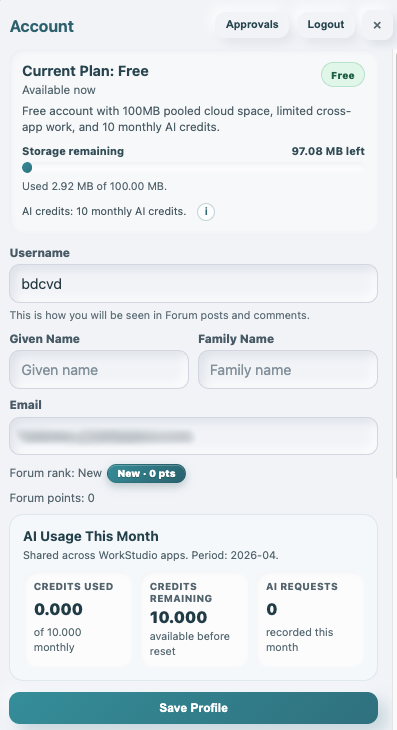
Check current usage in My Account
Use the account page to see your current plan summary, remaining storage, and the monthly AI usage box for the current period.
Enable JavaScript to use reading progress and usefulness ratings.