
Checkbox Columns and Sheet Info Panels in TableStudio
Use checkbox columns for checklist-style tracking, row styling, removed or N/A cells, and Sheet Info panels that summarize missing documents across several columns.
Use a checkbox column type when a table needs checklist-style tracking instead of free text.
A checkbox column can use three checked formats: normal check, attention !, or superseded x. The format controls the mark shown when the box is checked. A single cell can also be changed from the context menu when one row needs a different meaning.
In column settings, Entire column shows a checkbox in every normal row. Only if column has value shows the checkbox only while another column in the same row has a value. This is useful for document checklists where an item ID, item name, or other row label controls whether that row needs the document.
A checked checkbox can style the whole row. The row style can use fill color, text color, bold, italic, or strike. If the fill is transparent, TableStudio keeps the normal row fill, including alternate row fill, while still applying the other selected row styles.
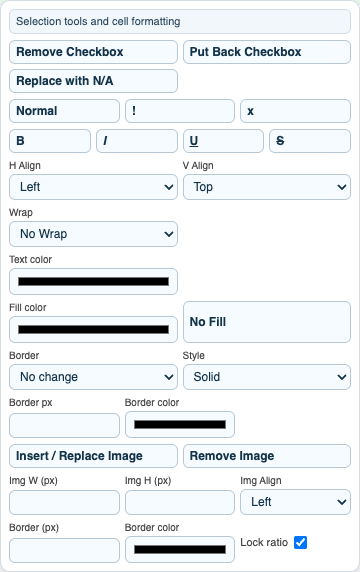
The checkbox context menu can remove the checkbox, put it back, replace it with N/A, or change the checkbox mark for one cell. A removed checkbox becomes a normal editable cell. Removed checkbox cells and N/A checkbox cells are skipped by Sheet Info missing-document counts.
Use File Settings > Add Sheet Info Panel when the sheet needs a visible summary. A Sheet Info panel is a movable object stored on the active sheet. It can print on the sheet, stay out of print, or print as a first/end summary page.
Sheet Info metric definitions use this form:
Name | Column(s) | Mode | Value
Columns can be a single column, a range, or a list. Examples are E, E:K, and E:F,I:K.
For document checklists, the most useful modes are missingDocs, ratioMissingDocs, and percentMissingDocs.
missingDocs counts unchecked checkbox cells as missing. Checked cells count as complete. Removed checkbox cells and N/A cells are skipped.
Fraction progress cells such as 0/6, 1/6, or 1/1 are also supported in non-checkbox columns. 0/6 means 6 missing, 1/6 means 5 missing, and 1/1 means 0 missing. This lets a sheet combine checkbox columns with progress-count columns in the same missing-document total.
Examples:
Missing Documents | E:F,I:K | missingDocsMissing Documents | E:K | ratioMissingDocsMissing Documents % | E:K | percentMissingDocsChecklist Items | | totalRows
Related: Column Type: Checkbox, Create a Checklist and Missing Documents Panel, TableStudio Column Types, TableStudio File Settings, Conditional Formatting in TableStudio, Print, Headers, and Footers in TableStudio.
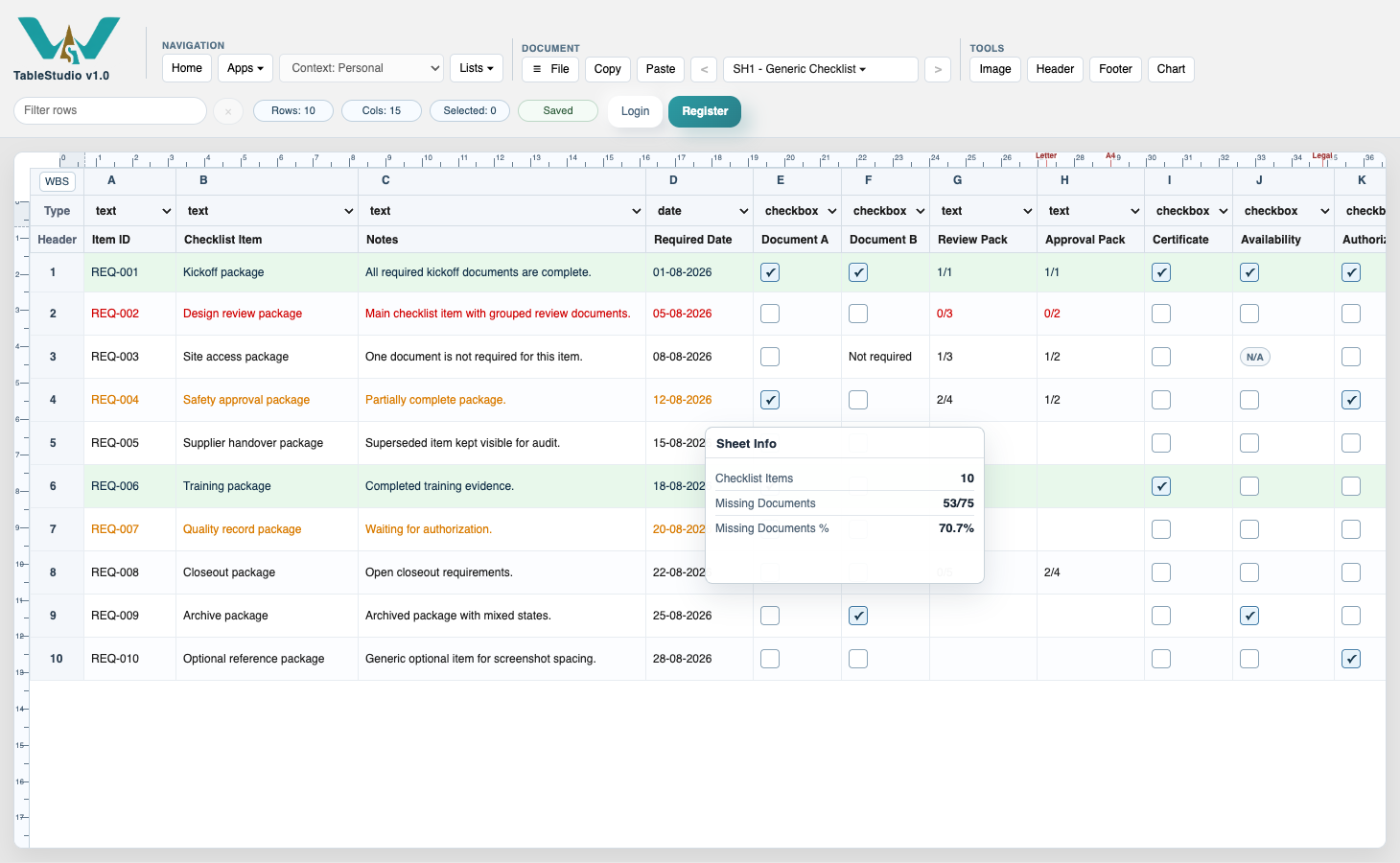
Checklist on the sheet
The live sheet can show checkbox states, row effects, progress fractions, and a movable Sheet Info panel together.
Checkbox exceptions
Use the context menu when one row needs a removed checkbox, N/A, or a different checkbox mark.
Missing documents across checkbox and progress columns
Sheet Info can combine checkbox columns such as E:F,I:K with fraction progress columns such as G:H.
Sheet Info metric definitions
Use a range or comma-separated column list when one summary should inspect several checklist columns.
Enable JavaScript to use reading progress and usefulness ratings.