
WorkStudio Context
Understand where Records collections and other WorkStudio apps read and save your information.
Context means the place where the app is working right now.
It answers where is this data being read from or saved to?
The main signed-in contexts are Personal, Company, and Project.
Personal is your own space.
Company is a shared team space.
Project is one project area inside a company.
Changing context changes the active data, lists, and storage target. The app itself stays the same.
That means the same app can look almost identical while the visible files, lists, and save target change underneath it.
Context is not exactly the same as save mode.
In TableStudio and DocStudio, you can still open the save window and choose a local, personal, or shared target.
A good habit is simple: before you load, save, or browse, check Context first.
Related: Saving in WorkStudio, WorkStudio Account Types, Saving in TableStudio, Saving in DocStudio, FileStudio.
In Records, Context selects the main Personal, Company or Project collection. Use Relations to connect the records in your working collection. Changing Context does not automatically copy those records, make every collection searchable together, or give someone access to private information. Start with Open Records in the Right Context.
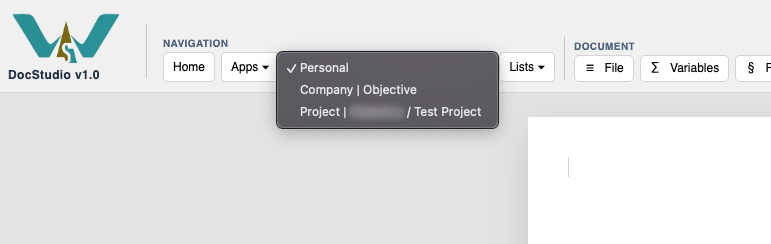
Open the Context menu
The context picker shows the available working targets, including Personal, Company, and Project.
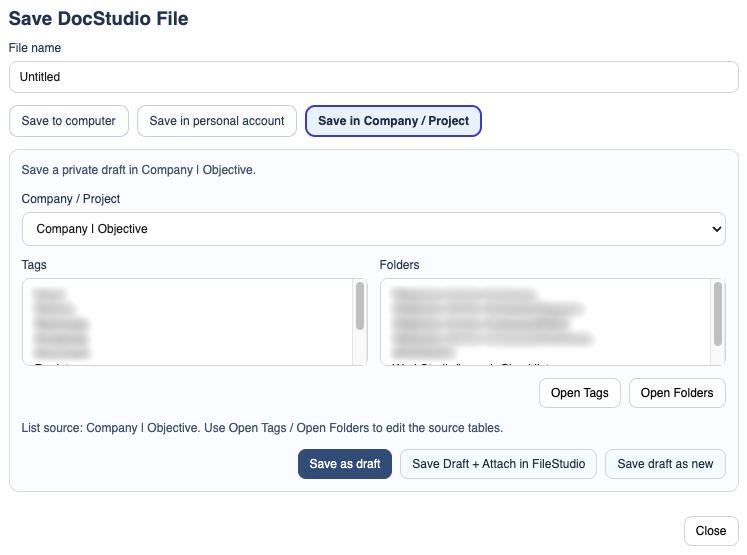
Save in a shared Company / Project target
The save window can still point to a shared company or project area after you choose the right context.
Enable JavaScript to use reading progress and usefulness ratings.