
DocStudio Templates
Explains the Blank, Templates, and Load choices, how template languages are selected, and when to start from a template.
Templates let you start from a prepared document instead of building the same layout again.
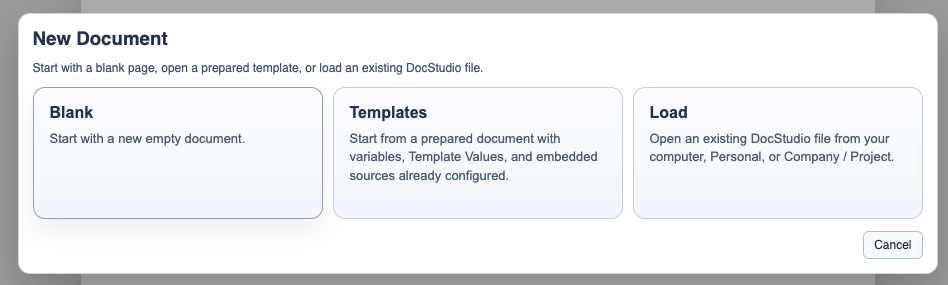
When DocStudio opens, the start window gives you three paths:
Blankstarts an empty document.
Templatesopens the built-in template browser.
Loadopens an existing.dsfrom your computer or account.
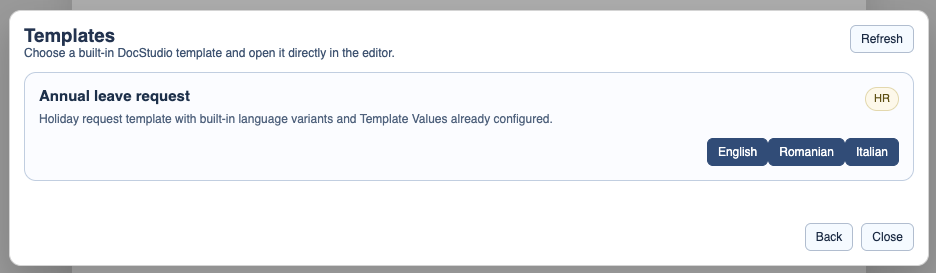
In the template browser, one template card can offer more than one language. Choose the language button you want and DocStudio opens that version directly.
Templates are normal DocStudio files with extra setup already inside them. They can include variables, Template Values, dropdowns, source-driven fields, and embedded data sources.
Use templates when the page layout should stay the same but the document values change from one instance to the next.
If you want to build your own, continue with Create a Template in DocStudio.
If you want to fill an existing template, open Use a Template in DocStudio.
For the built-in example, open Holiday Request Template.
If you prefer a guided walkthrough, open Generate a Holiday Request from a DocStudio Template.
Choose how to start
The opening window separates a blank document, built-in templates, and existing saved files.
Choose the template language
One template card can offer several language buttons. Pick the language you want and open that version directly.
Enable JavaScript to use reading progress and usefulness ratings.