
TimeLine and TaskBoard Compatibility
Explains the planned compatibility between TimeLine schedules and TaskBoard task views.
TimeLine and TaskBoard are planned to work together over the same planning data.
The intended model is that TimeLine controls the schedule structure: new tasks, deleted tasks, WBS parent changes, start dates, end dates, durations, calendars, predecessors, and calculation logic.
TaskBoard can then be used as a team-facing task surface. In linked files, TaskBoard should allow collaboration fields such as progress, responsible people, priority, tags, description, documents, comments, and completion status, while schedule-critical fields remain controlled by TimeLine.
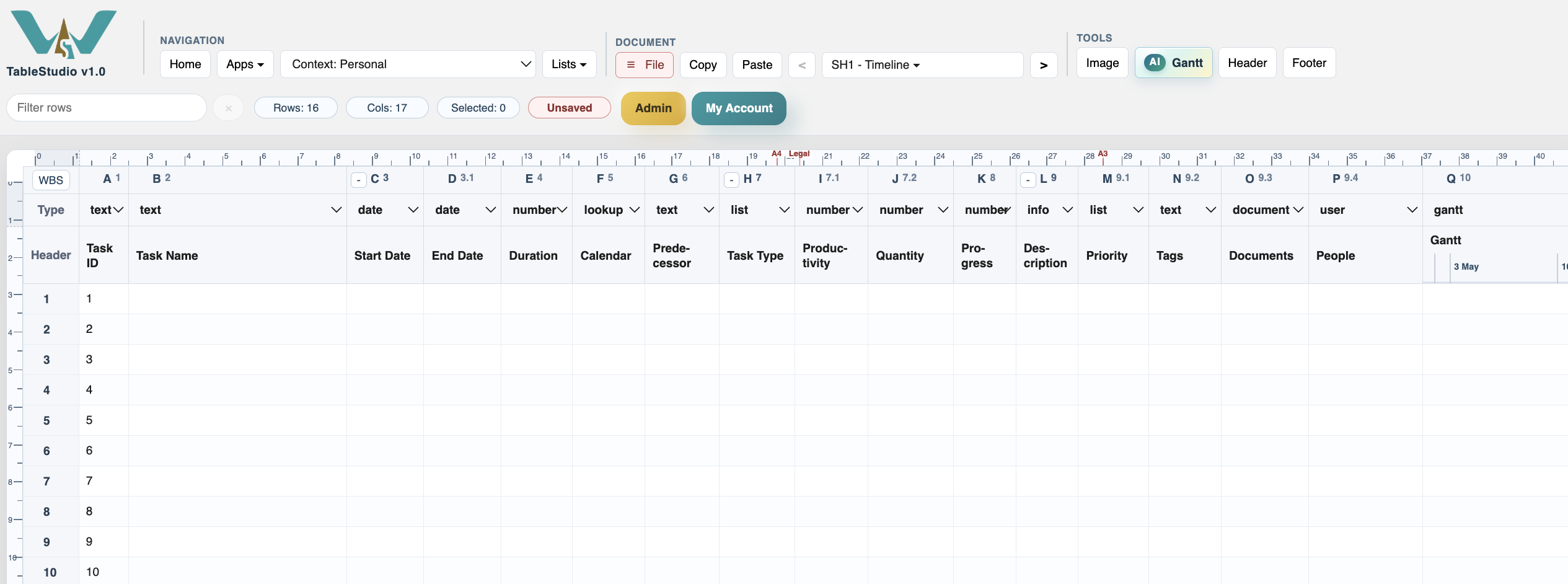
This is why TimeLine includes or reserves columns such as Progress, Description, Priority, Tags, Documents, and People. These fields make the schedule more compatible with board-style task management without losing Gantt logic.
When this connection is used, changes should stay synchronized so the same task does not become two separate records.
Related: TimeLine Columns, TaskBoard, Gantt View, Column Type: User.
Task collaboration columns
TimeLine can keep task collaboration fields beside the schedule fields so the file can later support TaskBoard-style work.
Enable JavaScript to use reading progress and usefulness ratings.