
Milestones
Explains milestone best practice, diamond display, milestone dates, and how links connect to milestones.
A milestone is a point in the programme, not an activity. Use it for events such as Design approved, Permit received, Phase complete, or Handover.
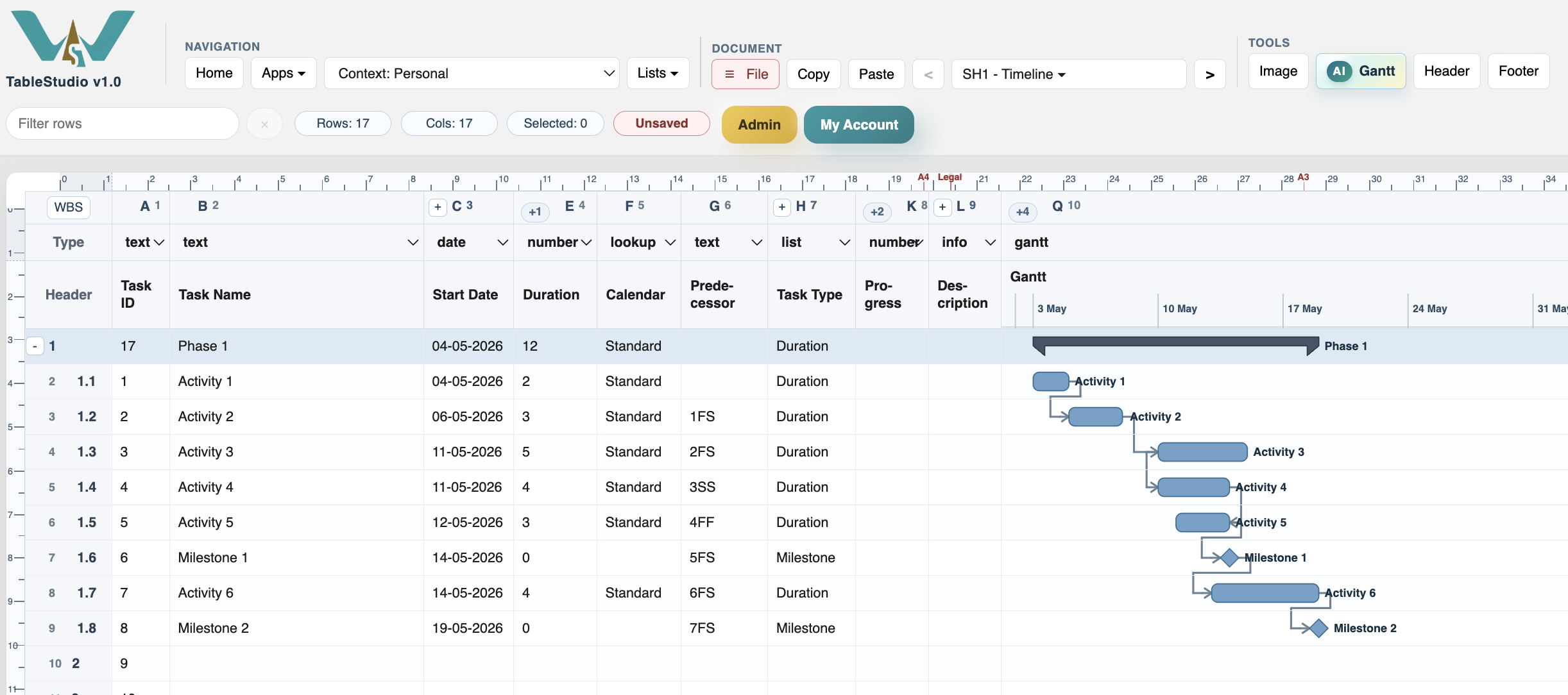
Best practice is to set milestone duration to 0. TimeLine draws zero-duration milestones as diamonds and shows the calculated Start Date and End Date as the milestone date.
A milestone can have predecessors and successors. For example, 5FS on a milestone means the milestone is driven by task 5 finishing. A successor linked from a milestone starts from that milestone date according to the selected relation and calendar.
If the Gantt day width is large, the milestone is placed on its date marker rather than stretched like a task bar.
Use milestone rows for decision points, approvals, delivery events, phase gates, and deadlines. Avoid using them to represent work that needs resources or multiple days.
Related: Task Types, Dependencies and Predecessors, Link Display.
Enable JavaScript to use reading progress and usefulness ratings.