
Views, Search, and Project Filters in Records
Find information without opening every record by using the grouped directory, focused Type views, search, Project filters, and WBS structure.
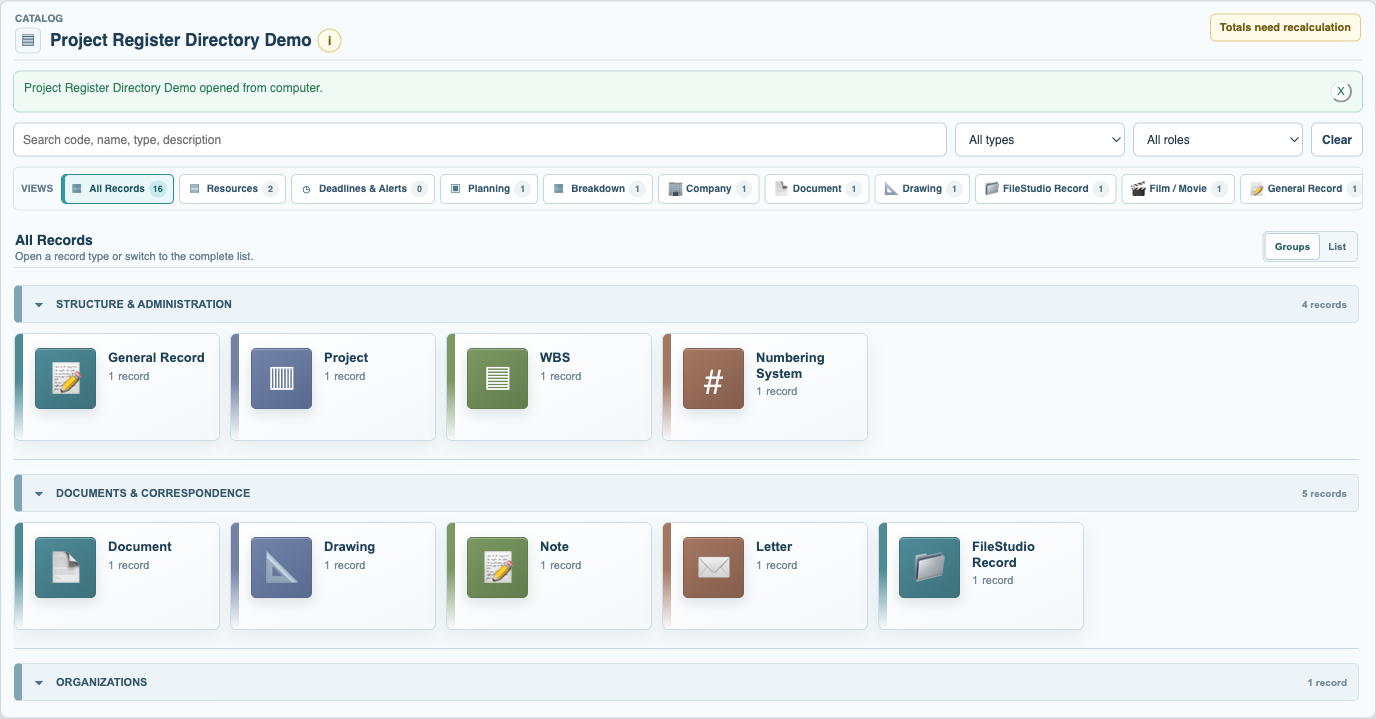
All Records opens as a grouped directory. Select a Type pane to open a focused table with columns that make sense for that Type. Switch to the complete List when you need all records together.
Type views are not separate copies. A Material shown in Resources and Materials is the same record, so a saved change is available wherever that record is used.
Use Search to narrow the active view. The Project filter can show records assigned to one Project or records with no Project. When a Project is opened, its WBS, Phase, BOQ, Breakdown and Resource views stay within that Project's scope.
WBS and Phase headings can be expanded, collapsed, nested and manually ordered. They can also route Types automatically, for example placing new Material records under a Materials heading. Personal display choices such as collapsed sections and Home shortcuts are saved for the signed-in user.
Related: How a Record Is Built, Open Records in the Right Context, Build a Project, WBS, and Phase Structure.
Choose a focused record view
Type groups keep a large collection approachable and open a table designed for the selected records.
Enable JavaScript to use reading progress and usefulness ratings.