
Leave Planner Template
Explains the TableStudio leave template for employee leave tracking and HR monitoring.
TableStudio can start from Blank, Templates, or Load. One of the template workflows available in the Templates popup is Leave Planner.
Use it when you want a fast employee leave register without building the formulas yourself. The main sheet tracks employee name, hire date, leave days per year, accrued days, used days, and remaining days.
Each employee row uses a TOBJ leave log. Inside that TOBJ, the user records the leave start date and end date. The object then calculates used days, counts weekends with the weekday formulas such as SATURDAY(start,end) and SUNDAY(start,end), leaves room for public holidays in the period, and includes an optional Info column for notes.
This makes the template useful in at least 2 ways:
- as a personal leave tracker for one manager or team lead
- as a lightweight HR monitoring table for several employees
The template is available in localized versions from the Templates popup. The loaded template is a normal TableStudio workbook after it opens. You can rename sheets, change column titles, update file settings, extend formulas, or save it as your own company version.
Related: TOBJ, Date Formulas, Saving in TableStudio.
Template preview
The leave planner keeps the main employee register visible while each person's leave details stay in a linked TOBJ.
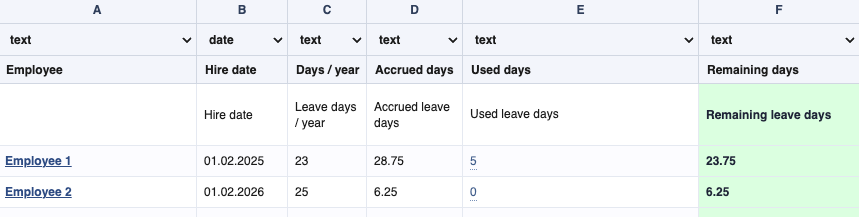
Main leave tracker
One row per employee, with accrued, used, and remaining leave days.
Enable JavaScript to use reading progress and usefulness ratings.