
Export PDF from TableStudio
Explains the Export PDF window, sheet selection, index options, page numbering, and how attached PDFs are inserted after each selected sheet.
Use Export PDF when a workbook must become a packaged PDF deliverable.
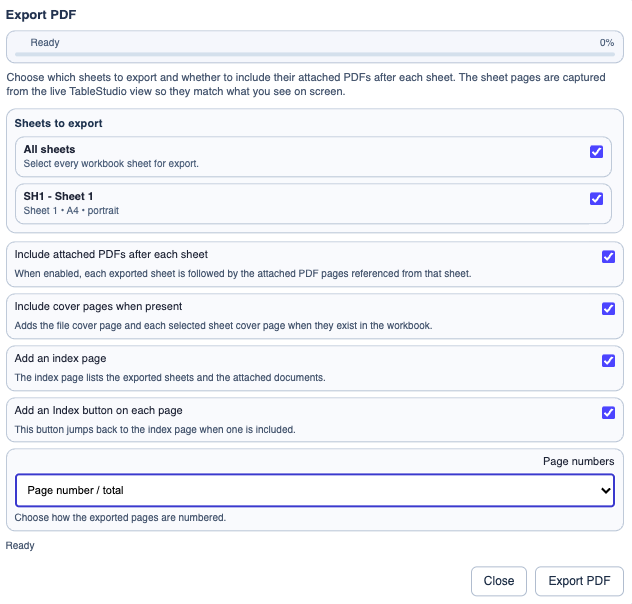
The export window lets you choose exactly which sheets to include. All sheets exports the full workbook, but you can also select only the sheets you need.
The current export options are:
Include attached PDFs after each sheetInclude cover pages when presentAdd an index pageAdd an Index button on each pagePage numbers
When attached PDFs are included, TableStudio places them after the related selected sheet instead of collecting every attachment only at the end. Links in document cells then jump to those appended PDF pages inside the exported file.
The export order is:
- document cover page, when enabled and present
- index page, when enabled
- sheet cover page, when enabled and present for that selected sheet
- sheet pages
- attached PDF documents used by that sheet, when included
If only one sheet is exported, the same order is used for that one sheet package.
Related: Cover Pages in TableStudio PDF Export, Add and Manage Cover Pages in TableStudio, Attach TableStudio Files to FileStudio.
Enable JavaScript to use reading progress and usefulness ratings.