
CONVERT
Converts temperature, length, weight/mass, and GPS/WGS84 <-> Romanian Stereo70 coordinates in TableStudio formulas.
Use CONVERT([what,] from, to, value) when a formula needs a unit or coordinate conversion. The most important coordinate workflow is the easy transform between GPS/WGS84 and Romanian Stereo70.
GPS to Stereo70
Use =CONVERT(c,gps,s70,"lat, lon") or split the input across cells with =CONVERT(c,gps,s70,A1,B1). GPS/WGS84 input order is always latitude, longitude in decimal degrees. Stereo70 output is x, y in meters.
Example: =CONVERT(c,gps,s70,"47.18657465881057, 27.58385615585379") returns 695907.563, 635113.710.
Stereo70 to GPS
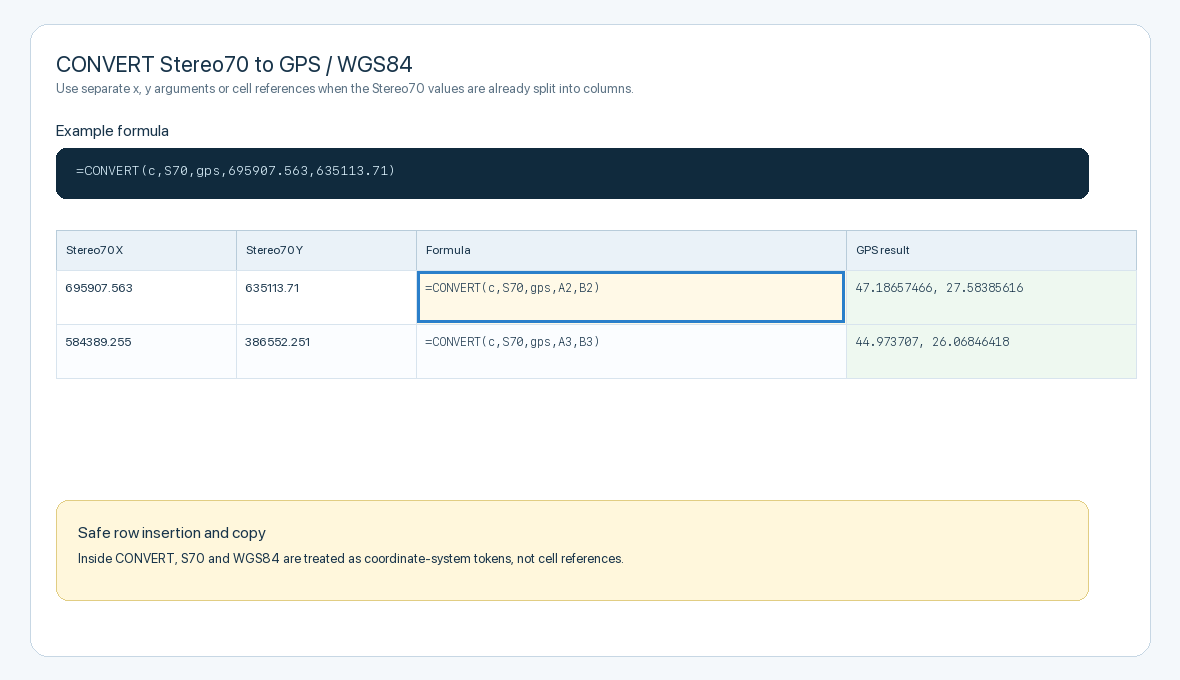
Use =CONVERT(c,S70,gps,x,y) when the source is already in Romanian Stereo70 meters. Stereo70 input order is x, y. The output is latitude, longitude, which can be passed into LOCATION with =LOCATION(A1, level, name).
Example: =CONVERT(c,S70,gps,695907.563,635113.71) returns 47.18657466, 27.58385616.
Accepted coordinate names
For GPS/WGS84, use gps, wgs84, w84, or EPSG:4326. Use WGS84 as the correct name; W84 is accepted as a forgiving alias.
For Romanian Stereo70, use stereo70, s70, EPSG:3844, or EPSG:31700. Inside CONVERT, these names are treated as coordinate-system tokens, so inserting rows or copying formulas will not accidentally change S70 into a cell reference such as S71.
Other conversion families
Temperature supports C, F, K, plus full names such as Celsius, Fahrenheit, and Kelvin. Example: =CONVERT(temp,C,F,20).
Length supports common metric, imperial, and nautical units: mm, cm, m, km, in, ft, yd, mi, nmi, and full names. Example: =CONVERT(length,m,ft,10).
Weight/mass supports mg, g, kg, t, tonne, oz, lb, stone, and full names. Example: =CONVERT(weight,kg,lb,10).
Coordinate conversion uses PROJ-compatible Romanian Stereo70 parameters: +proj=sterea +lat_0=46 +lon_0=25 +k=0.99975 +x_0=500000 +y_0=500000 +ellps=krass with datum shift 33.4,-146.6,-76.3,-0.359,-0.053,0.844,-0.84. It is suitable for practical table, chart, and coordination work. For cadastral-grade or legally binding transformations, verify with the authoritative surveying workflow used on the project.
Related: Convert GPS and Stereo70 Coordinates in TableStudio, TableStudio Functions, Locations and Map Charts in TableStudio.
Function
CONVERT([what,] from, to, value)
CONVERT(coord, gps, s70, "lat, lon")
CONVERT(coord, gps, s70, lat, lon)
CONVERT(coord, s70, gps, x, y)
CONVERT(temp, C, F, value)
CONVERT(length, m, ft, value)
CONVERT(weight, kg, lb, value)
Parameters
- what — Optional helper. Use
c,coord, orcoordinatesfor coordinate transforms;t,temp, ortemperature;lorlength;w,g,weight, ormass. - from — The source unit or coordinate system. For coordinates, accepted values include
gps,wgs84,w84,EPSG:4326,stereo70,s70,EPSG:3844, andEPSG:31700. - to — The target unit or coordinate system. Use
gps/wgs84for latitude and longitude, ors70/stereo70for Romanian Stereo70 meters. - value — A numeric value, cell reference, formula result, LOCATION cell, or quoted coordinate pair.
- x, y / lat, lon — Optional separate coordinate arguments used instead of one quoted pair. They can be direct numbers or cell references, for example
=CONVERT(c,S70,gps,A1,B1).
Returns
Returns a number for temperature, length, and weight conversions. Coordinate conversions return a text pair: x, y in Stereo70 meters or latitude, longitude in WGS84 decimal degrees.
=CONVERT(c,gps,s70,"47.18657465881057, 27.58385615585379") returns 695907.563, 635113.710.
=CONVERT(c,S70,gps,695907.563,635113.71) returns 47.18657466, 27.58385616.
=CONVERT(temp,C,F,20) returns 68.
=CONVERT(length,m,ft,10) returns 32.8083989501.
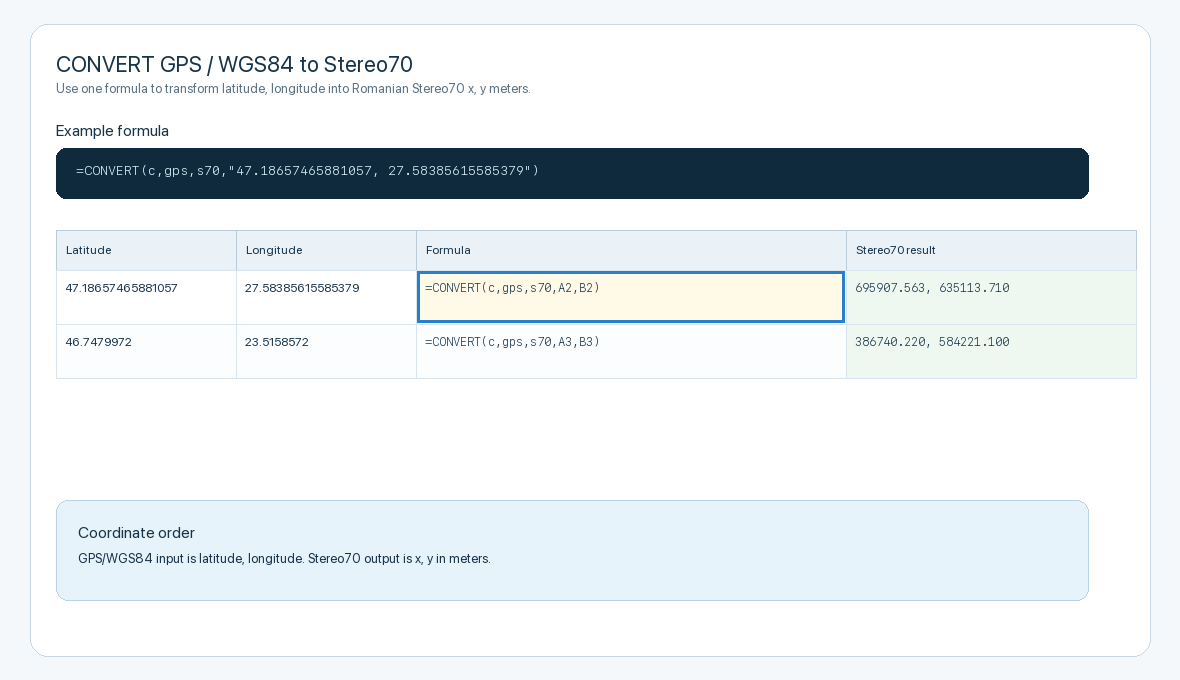
GPS to Stereo70
Use latitude, longitude as input and receive Stereo70 x, y meters.
Stereo70 to GPS
Use x, y Stereo70 meters as input and receive WGS84 latitude, longitude.
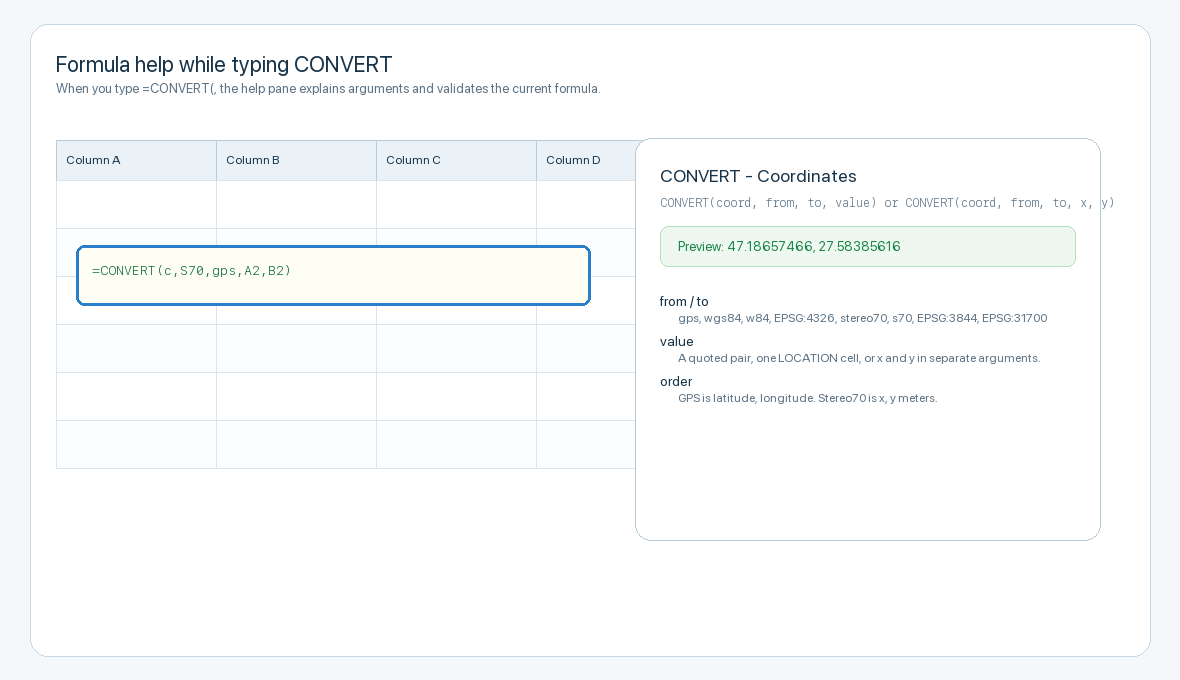
Formula help while typing
The formula help pane explains coordinate order, accepted aliases, and current preview result.
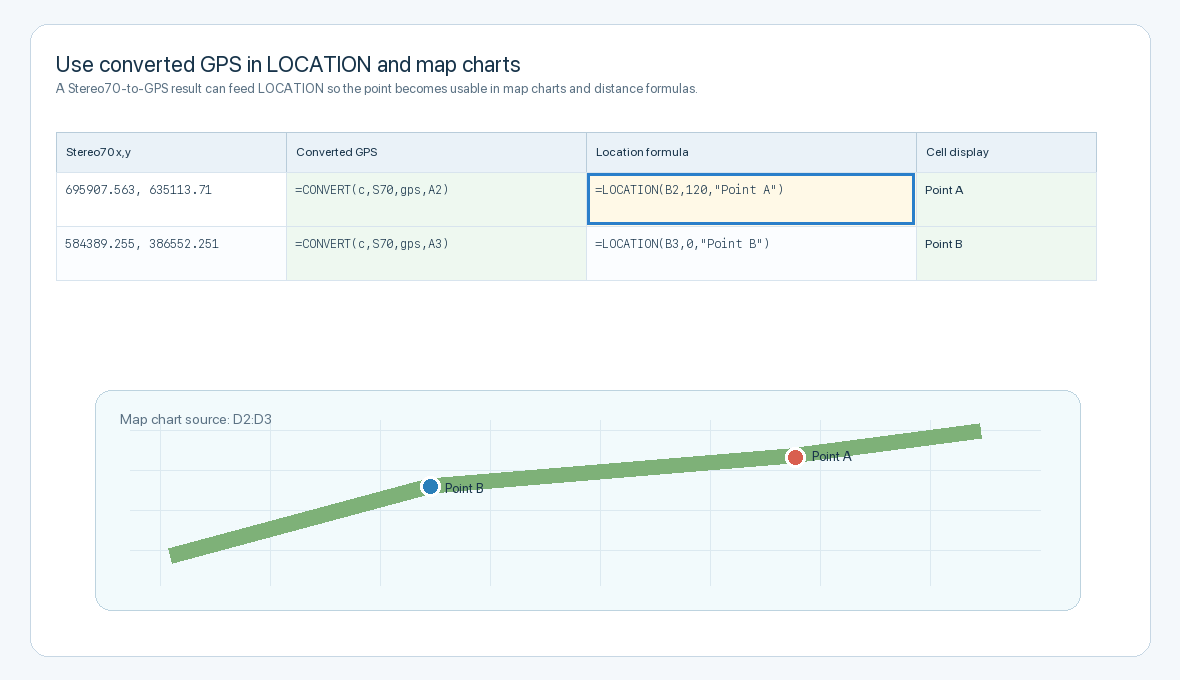
Use converted coordinates in LOCATION
A Stereo70-to-GPS result can feed LOCATION, map charts, distance, polyline, and area formulas.
Enable JavaScript to use reading progress and usefulness ratings.