
Person Measurements and Weight History
Store dated height and weight values, review the newest measurement quickly, and open a larger history chart when needed.
Person records can keep repeatable dated Height and Weight values. The newest values are shown first and are used to calculate BMI when both measurements are available. Older values stay attached to the same Person rather than becoming separate people or unrelated notes.
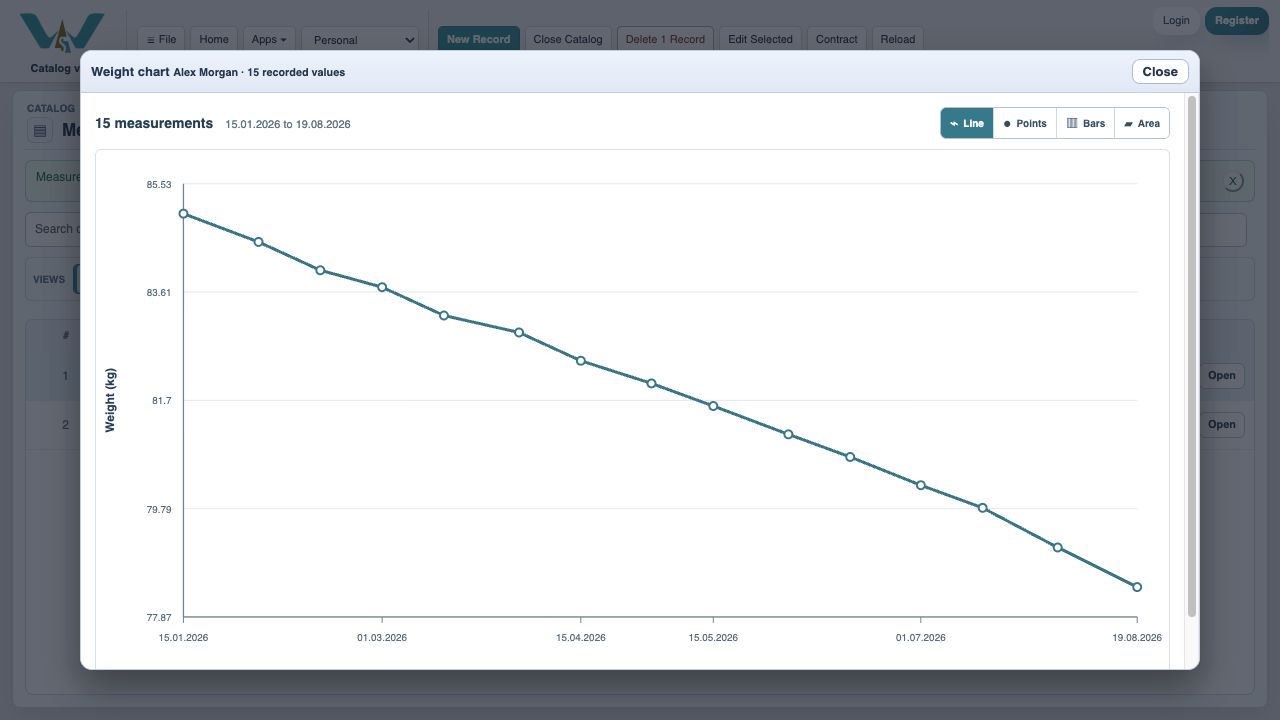
Use Add Weight or Add Height for a new dated value. The compact Person view loads a small representative chart; expand it to inspect the complete history with Line, Points, Bars, or Area display and exact values on hover.
For an existing CSV, XLSX, XLSM, or XML history, use File > Import Rows / Data, select Weight or Height, map Person, value, and date, then connect each imported person name to an existing Person record. The importer reviews invalid, duplicate, or unmatched rows before applying them.
Measurements and BMI are record-keeping tools, not medical advice. Tutorial: Track Your Weight Over Time.
Inspect the complete measurement history
The expanded chart provides display choices, axes, and exact dated values.
Enable JavaScript to use reading progress and usefulness ratings.