
When a dashboard tells the wrong story
Check denominators, weighted averages, time windows and chart axes with simple examples before trusting the headline number.
A dashboard does not need incorrect arithmetic to mislead. It can use a correct number with the wrong denominator, a convenient time window or a visual scale that exaggerates the difference. The first task is to reconstruct the question behind the number.
Ask what decision the display supports. “Are customers waiting longer?” is different from “Did the team close more requests?” More completed requests can coexist with a growing queue and longer waits for difficult cases.
Count and rate can move in opposite directions
In a fictional service, 20 of 100 requests were late last month. This month, 30 of 300 were late. The late count increased from 20 to 30, a 50% increase. The late rate fell from 20% to 10%, a reduction of 10 percentage points, or 50% relative to the original rate.
Neither statement is false. A manager concerned with the number of affected customers needs the count; a manager comparing performance under different volumes also needs the rate. A useful display presents both and defines which requests enter the denominator.
Check exclusions. If cancelled or difficult requests disappear from the calculation, a better-looking rate may reflect a changed population rather than better service. Keep the inclusion rule stable or label the change clearly.
| Period | Late | All included requests | Late rate |
|---|---|---|---|
| Previous month | 20 | 100 | 20% |
| Current month | 30 | 300 | 10% |
| Change | +50% | +200% | −10 percentage points (−50% relative) |
Do not average averages without their weights
Suppose team A handled nine cases averaging three days, while team B handled one case taking twelve days. The simple average of the two team averages is 7.5 days. The case-weighted average is (9 × 3 + 1 × 12) / 10 = 3.9 days.
The 7.5-day figure answers a different question in which both teams receive equal weight. If the headline claims the average case took 7.5 days, it is misleading. Carry the underlying case counts with each average so aggregation can be checked.
Averages can also hide the tail. For five fictional cases lasting 1, 1, 2, 2 and 20 days, the median is 2 days and the mean is 5.2 days. Both are useful, but neither alone explains the one customer waiting twenty days. Consider showing the distribution or a clearly defined long-wait measure.
| Team | Cases | Average days | Total case-days |
|---|---|---|---|
| A | 9 | 3 | 27 |
| B | 1 | 12 | 12 |
| Combined | 10 | 3.9 | 39 |
Compare like periods and like populations
A complete 31-day month should not be compared with ten days of the current month without a visible qualification. A daily average can help, but weekday patterns, holidays, seasonal demand and the mix of work still matter.
For a project dashboard, distinguish the reporting date from the data refresh date. A chart refreshed today may contain last week's site measurements. For a service dashboard, distinguish cases opened in the period from cases closed in the period; mixing those populations can create a completion rate that answers no coherent question.
If a definition changes, retain a break marker or restate the historical series using a documented method. Silently joining incompatible series creates a trend that did not actually occur.
Read the geometry as well as the labels
ONS guidance recommends zero baselines for bar and area charts, where size conveys magnitude. Line and scatter charts can use a restricted range when that supports interpretation and is clearly labelled. A cropped axis is not automatically dishonest; the question is whether the chart's visual encoding supports the intended comparison. ONS: axes and gridlines.
Imagine bars for 98% and 99% starting at 97%. Their visible lengths become one and two units, suggesting a doubling although the reported rate rose by one percentage point. Show the full scale or choose another presentation that makes the small difference explicit.
Avoid colour-only status. Include labels such as “target missed” and provide values or an accessible data view so readers do not need to distinguish red from green.
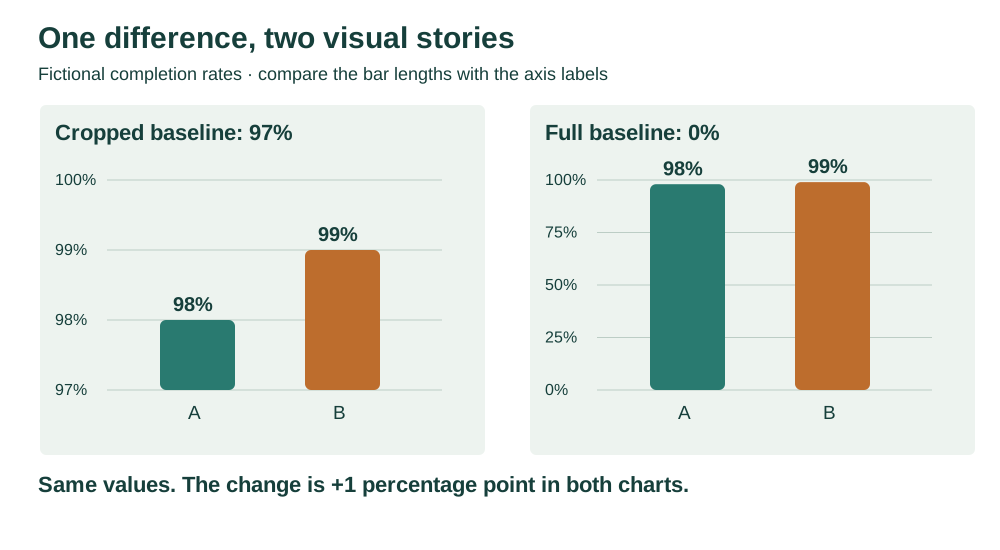
Look at the axis before reading the headline. The actual increase is 1 percentage point, approximately 1.02% relative to 98%; it is not a 100% increase. The left bar lengths are 1 and 2 only because 97 was subtracted from both values.
Show uncertainty where it changes the decision
A forecast is not an observed result. Separate actuals from projections and explain the assumptions or range. ONS guidance treats uncertainty as something to communicate when it affects interpretation, rather than decoration to add indiscriminately. ONS: showing uncertainty.
Do not attach a statistical confidence interval to a convenience sample without a justified method. Conversely, do not print an uncertain forecast to two decimal places merely because the software can.
A five-minute review before sharing
Trace one headline number back to its records. Recalculate its numerator and denominator. Check dates, exclusions and weighting. Compare the chart's apparent message with the actual difference. Finally, ask what important fact is absent: outstanding work, reopens, missing measurements or an unrepresented group.
Record the metric definition and an owner beside the dashboard documentation. When readers can reproduce the number, a disagreement becomes a useful discussion about the decision rather than an argument over a mysterious score.
Enable JavaScript to use reading progress and usefulness ratings.