
IN Code Stamping and Confirmation Email
Explains incoming IN-code auto-numbering, stamped PDF preview/download, and Copy Email Text for receipt confirmations.
IN Code is FileStudio's incoming registration number or incoming reference field.
The incoming IN-code auto-number format can create the next number by scanning registered documents. Use {{next:IN-###}} when the numeric part should increase automatically. The ### controls zero padding. {{today}} inserts today's date.
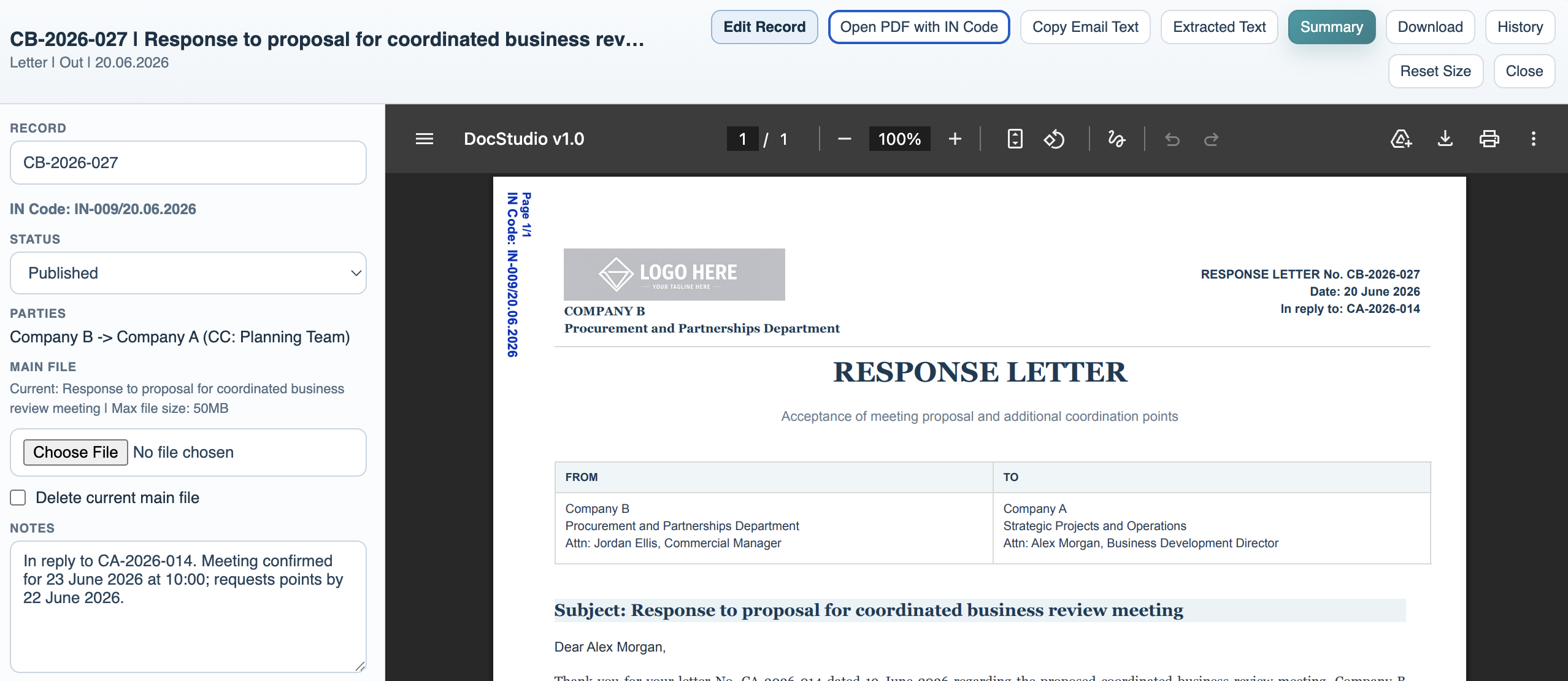
When a PDF document has an IN Code, the viewer can reopen the PDF with the IN Code stamped on each page. The stamp is blue and placed near the top-left side to reduce overlap with normal letter content.
If you download while viewing the stamped PDF, FileStudio downloads the stamped version.
Confirmation Email helps create response emails confirming receipt. Configure the default email text in File Settings. Then use Copy Email Text from the stamped-document viewer to put the prepared receipt text on the clipboard.
The template can include values such as {{registrationNumber}}, {{inCode}}, {{code}}, {{title}}, {{date}}, {{from}}, {{to}}, and {{fileName}}.
Related: FileStudio File Settings, Registering a Record in FileStudio.
Stamped PDF viewer
The viewer can show the stamped PDF, display the IN Code in the record sidebar, and offer Copy Email Text.
Enable JavaScript to use reading progress and usefulness ratings.