
Export a Container / Package to PDF
Open the package and choose Export PDF. For one WBS, tag, Responsible or Status group, use Export PDF on that group heading instead.
The package PDF is an index plus the selected evidence. Export PDF on the Container / Package covers the full package; Export PDF on a group heading covers only that group. A parent WBS includes its descendants. The export sheet identifies the scope and recalculates summaries for it.
Review every option group before export. Language: English or Romanian. Item scope: choose the items to include. Summary and progress: choose counts, missing-document and Expired warnings, and overall completed/total progress. Fields: choose the item properties, notes, responsibility, deadline, individual Percentage Complete and document validity details. Index: choose grouping and the Phase / WBS classification/overview. Page layout: choose orientation.
Cover Pages: choose group covers and document covers; the record can store their defaults. Group covers apply to Phase/WBS and Primary Tag grouping. The saved Export Title stays the main heading; a scoped group and subtitle appear beneath it. Logo: use a linked Company logo or custom logo set on the record. Page references: From-to range or First page only. Navigation: review page numbers and Back to Index links. Evidence: choose whether attached PDFs are appended and whether explicit selected-page extracts are included.
WorkStudio.Online mark: Do not include, First page, Last page, First and last pages, or Every page. Maximum PDF size (MB): leave empty for one PDF; a smaller limit can produce numbered parts in a ZIP, with a README. A single oversized source page remains intact and is reported. Package digitally signed originals in ZIP preserves detected originals unchanged; detection is advisory and this fictional example contains no digital signatures. Compiling a PDF is not signature validation.
Reused pages link to existing compiled evidence unless a separate extract was requested. Inspect the exported index, page ranges, warnings, headings and evidence, not just the download filename.
All companies, prices, quantities, dates and documents are fictional examples. They demonstrate the software, not real offers, project evidence or commercial advice.
Export a Container / Package to PDF
Follow the on-screen click instructions and highlighted controls. Field entry moves more quickly; pause or use chapters whenever needed. All companies, prices, quantities, dates and documents are fictional examples. They demonstrate the software, not real offers, project evidence or commercial advice.
Select the scope
Open the package and choose Export PDF. For one WBS, tag, Responsible or Status group, use Export PDF on that group heading instead.
Choose language and included items
Review the identified scope. Select English and the intended item scope. Keep incomplete/expired items visible in this teaching export.
Review summary and fields
Enable the desired summary counts, overall progress, item percentages, responsibility, deadlines, notes and document validity/expired warnings.
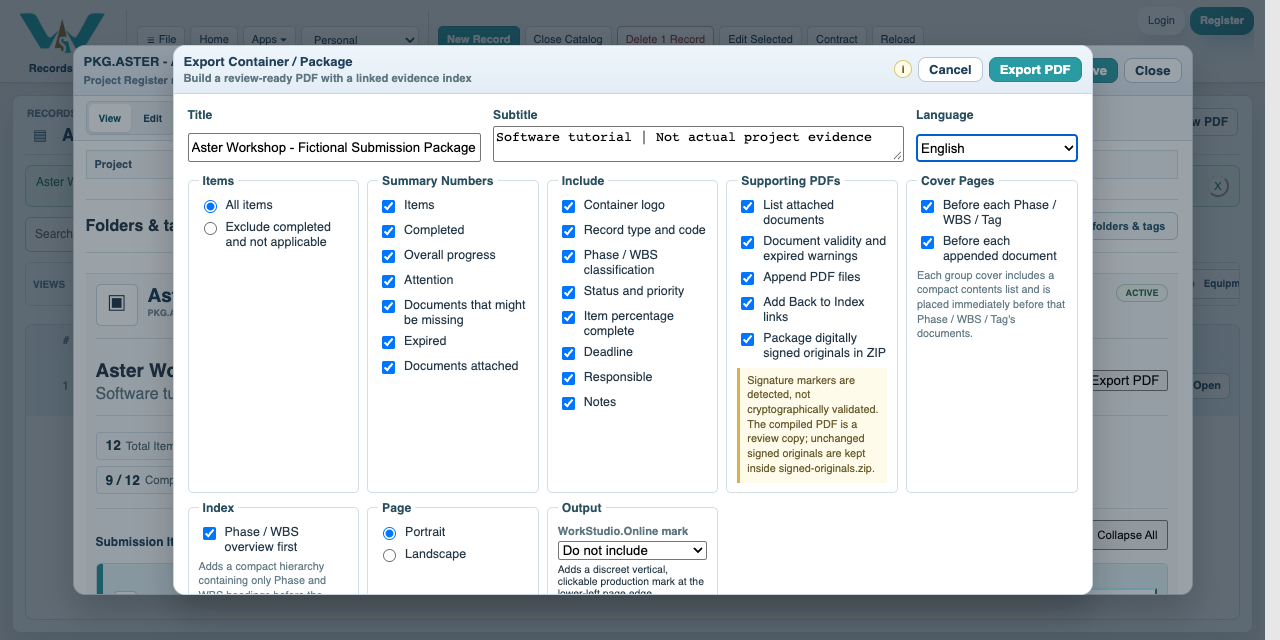
Choose index and covers
Group by Phase / WBS, enable the overview, and choose group/document covers. For Responsible-only output, clear Phase / WBS classification to avoid exposing that hierarchy.
Choose layout and references
Review orientation, From-to range versus First page only, page numbers, Back to Index and the WorkStudio.Online mark.
Choose evidence and size handling
Append PDFs. Keep a single PDF by leaving Maximum PDF size empty, or enter a size limit for split output. Keep signed-original packaging enabled when real signed sources are involved.
Export and inspect
Select Export PDF. Open the actual generated example below. Follow an index link to evidence and Back to Index; verify reused source pages are not duplicated.
Save reusable defaults
Save the package record and .ca collection. Store the reviewed output using an appropriate project naming and revision convention.
Enable JavaScript to use reading progress and usefulness ratings.