
WorkStudio Help
Records

Add Documents to a Container / Package

Choose New Record > Container / Package. Enter Aster submission package. Set Export Title and Export Subtitle.

Container / Package is the same existing Container record type, with a clearer displayed name. Existing record IDs, files and links remain compatible. A package is an ordered list of typed items with optional linked records, review fields and document references. Changing an item does not change its linked record.

An item can be a planned requirement before its document exists. Choose the Type first, then optionally link a record. Use Add From Computer or Add From FileStudio; FileStudio can supply a main document or an annex. A clear document Name is used in the index. The example contains ten generated PDFs and twelve items: ten source PDFs, one reused page reference and one planned requirement without a document.

Use From Container reuses the stored file. Select pages such as 2 or 2,4,7-9 when appropriate. Leave Add selected pages as a separate extract off to link to the source already included in the export. Turn it on only when an extra extract must actually be appended. Replace clears old page/marked-area settings, so review them again.

All companies, prices, quantities, dates and documents are fictional examples. They demonstrate the software, not real offers, project evidence or commercial advice.

Add Documents to a Container / Package

Follow the on-screen click instructions and highlighted controls. Field entry moves more quickly; pause or use chapters whenever needed. All companies, prices, quantities, dates and documents are fictional examples. They demonstrate the software, not real offers, project evidence or commercial advice.

Create the package

Choose New Record > Container / Package. Enter Aster submission package. Set Export Title and Export Subtitle.

Add a typed item

In Contained Items choose Add Item and Type Document. Enter Company profile. Linking an existing record is optional.

Attach and name the document

Choose Add From Computer and select 04-company-profile.pdf. Enter Company profile as its Name. Assign the relevant Document Type.
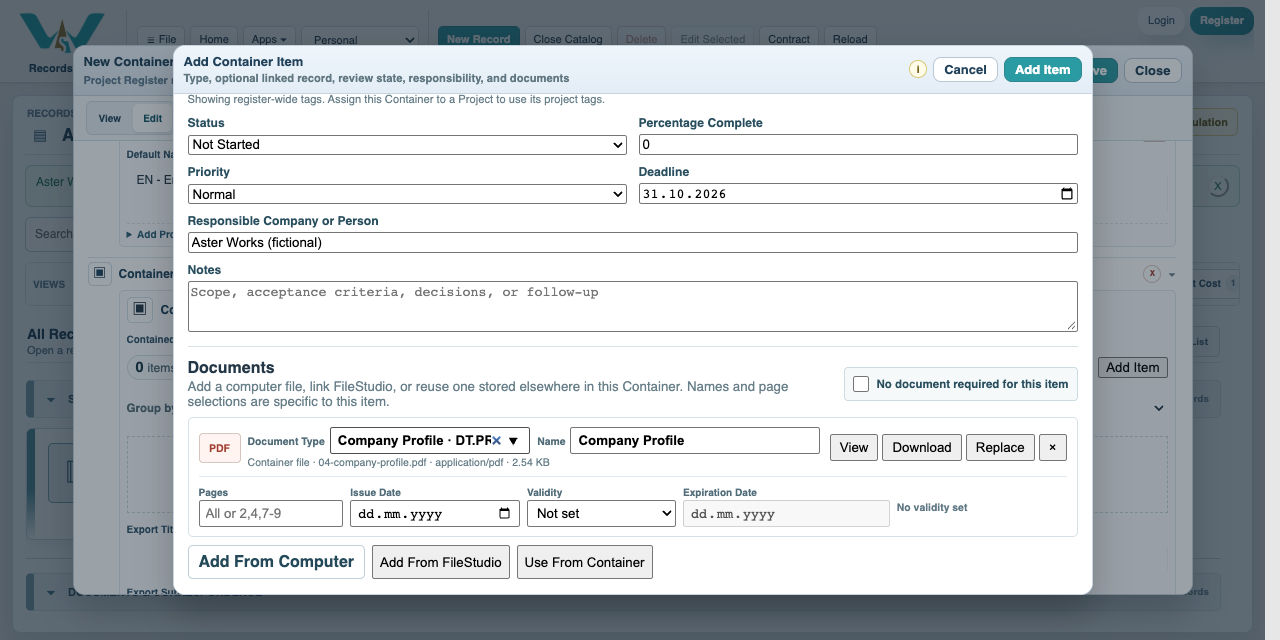
Attach and name the document in Catalog with fictional Aster data

Add all ten generated PDFs

Repeat for the ten files offered below, using separate items for company evidence, commercial offers and delivery/review. Apply each item, then save the Container / Package.

Reuse selected evidence

Add Commercial notes - reused source. Choose Use From Container, select 01-material-offer.pdf and Pages 2. Keep separate extract off.

Review or replace a file

Open the document count to review attachments. Use View for PDF pages and marks, Download for a copy, or Replace for a revised file. Recheck page selections after replacement.

Completed Aster project and packageAll companies, prices, quantities, dates and documents are fictional examples. They demonstrate the software, not real offers, project evidence or commercial advice.Aster starter exerciseAll companies, prices, quantities, dates and documents are fictional examples. They demonstrate the software, not real offers, project evidence or commercial advice.Material Offer - fictional PDFThis is a fictional, generated PDF. Some facts may repeat or be implausible; it demonstrates the functionality, not actual real data. It is not valid commercial, insurance, safety or certification evidence.Labour Offer - fictional PDFThis is a fictional, generated PDF. Some facts may repeat or be implausible; it demonstrates the functionality, not actual real data. It is not valid commercial, insurance, safety or certification evidence.Equipment Transport Offer - fictional PDFThis is a fictional, generated PDF. Some facts may repeat or be implausible; it demonstrates the functionality, not actual real data. It is not valid commercial, insurance, safety or certification evidence.Company Profile - fictional PDFThis is a fictional, generated PDF. Some facts may repeat or be implausible; it demonstrates the functionality, not actual real data. It is not valid commercial, insurance, safety or certification evidence.Method Statement - fictional PDFThis is a fictional, generated PDF. Some facts may repeat or be implausible; it demonstrates the functionality, not actual real data. It is not valid commercial, insurance, safety or certification evidence.Safety Plan - fictional PDFThis is a fictional, generated PDF. Some facts may repeat or be implausible; it demonstrates the functionality, not actual real data. It is not valid commercial, insurance, safety or certification evidence.Insurance Example - fictional PDFThis is a fictional, generated PDF. Some facts may repeat or be implausible; it demonstrates the functionality, not actual real data. It is not valid commercial, insurance, safety or certification evidence.Material Declaration - fictional PDFThis is a fictional, generated PDF. Some facts may repeat or be implausible; it demonstrates the functionality, not actual real data. It is not valid commercial, insurance, safety or certification evidence.Inspection Report - fictional PDFThis is a fictional, generated PDF. Some facts may repeat or be implausible; it demonstrates the functionality, not actual real data. It is not valid commercial, insurance, safety or certification evidence.Handover Letter - fictional PDFThis is a fictional, generated PDF. Some facts may repeat or be implausible; it demonstrates the functionality, not actual real data. It is not valid commercial, insurance, safety or certification evidence.

Enable JavaScript to use reading progress and usefulness ratings.