
Choose Project Pricing and Price Sets
Choose Project Pricing and Price Sets with a fictional company example.
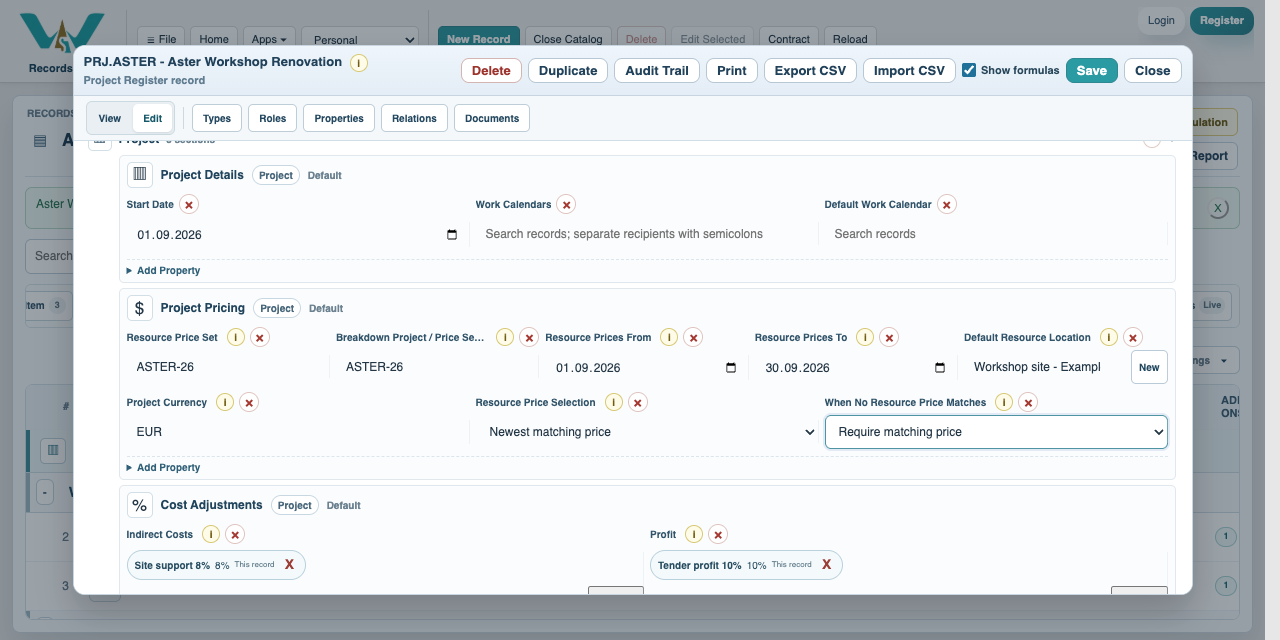
Project Pricing separates two choices. Breakdown Project / Price Set Code selects the eligible recipe set for selection and import. Resource Price Set selects observations inside Resource Price History. They may both read ASTER-26, but refer to different records. An existing BOQ still points to its exact assigned Breakdown.
The current resource selection checks the price set, exact Location reference or matching displayed location, and the date or date interval. It does not infer a geographic hierarchy. Supplier remains provenance on each row. Newest matching price selects within the matching rows; Use marked price first can prefer a marked row within that match. A saved preferred observation within a price-set/year group can also take precedence. Review the resolved row and offer.
Set When No Resource Price Matches to Require matching price for this exercise. Use newest available can fall back outside the requested criteria when none match. Do not mistake that fallback for a matching quote. An assignment can override the Project criteria; review overrides when a rate differs from the Project expectation. Currency conversion requires reviewed exchange rates; this example uses EUR throughout.
All companies, prices, quantities, dates and documents are fictional examples. They demonstrate the software, not real offers, project evidence or commercial advice.
Choose Project Pricing and Price Sets
Follow the on-screen click instructions and highlighted controls. Field entry moves more quickly; pause or use chapters whenever needed. All companies, prices, quantities, dates and documents are fictional examples. They demonstrate the software, not real offers, project evidence or commercial advice.
Open the Project pricing section
Open Aster Workshop Renovation > Edit > Project Pricing.
Choose recipe and resource sets separately
Set Breakdown Project / Price Set Code to ASTER-26 and Resource Price Set to ASTER-26.
Restrict the observation dates
Set Resource Prices From 2026-09-01 and To 2026-09-30. Choose Workshop site - Example Town and Project Currency EUR.
Prevent unrelated fallback
Select Newest matching price and Require matching price. Save the Project.
Check the selected offer
Recalculate costs. Floor panels must resolve to September ASTER-26 at 18 EUR/m2, despite a newer ALT-26 observation at 20.
Review an assignment override
Open a component or BOQ Breakdown assignment to inspect its Price Set, effective date or interval, location and currency. Keep Project pricing unless a deliberate exception is needed.
Enable JavaScript to use reading progress and usefulness ratings.