
Create a BOQ Item and Assign a Breakdown
Create a BOQ Item and Assign a Breakdown with a fictional company example.
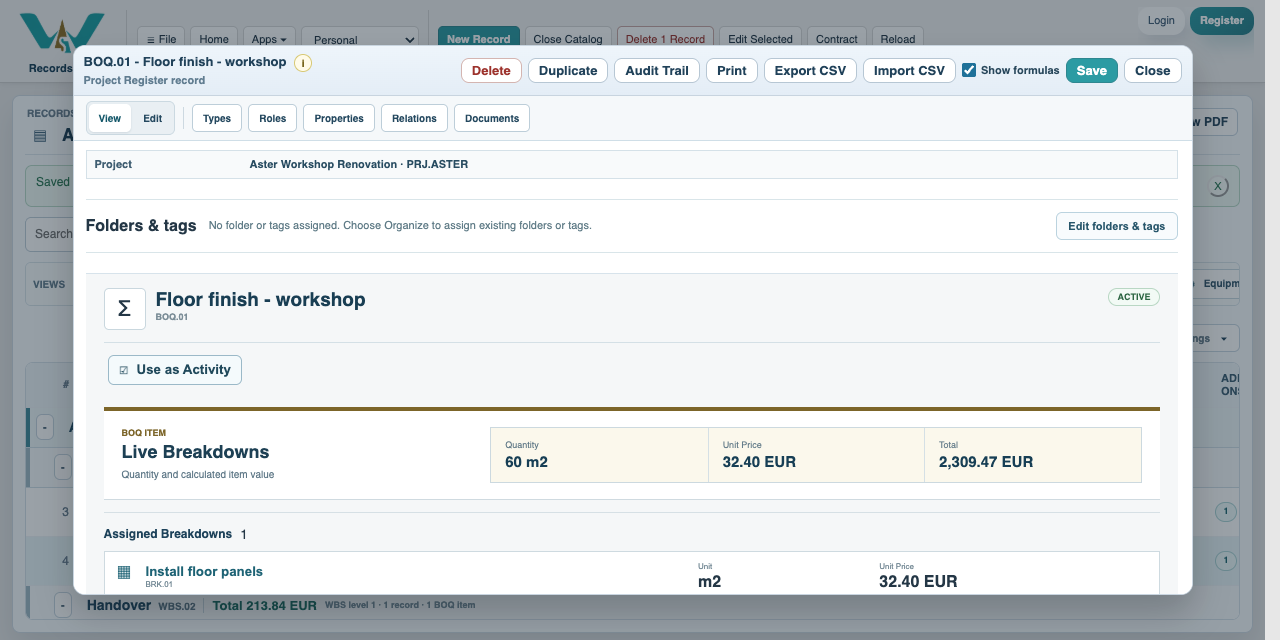
A BOQ item combines a measured output quantity with one or more assigned Breakdowns. Its unit must match the recipe output unless you intentionally review a unit mismatch. The floor item is 60 m2 multiplied by the 32.40 EUR/m2 floor recipe: 1,944.00 EUR direct cost.
An imported Value Only item can contribute a supplied price without a Breakdown. It has no recipe to expand into resource consumption, so a Resource Report will not explain that amount. Assign a reviewed Breakdown to obtain a resource-based cost. Missing references and unit mismatches require review.
All companies, prices, quantities, dates and documents are fictional examples. They demonstrate the software, not real offers, project evidence or commercial advice.
Create a BOQ Item and Assign a Breakdown
Follow the on-screen click instructions and highlighted controls. Field entry moves more quickly; pause or use chapters whenever needed. All companies, prices, quantities, dates and documents are fictional examples. They demonstrate the software, not real offers, project evidence or commercial advice.
Create the BOQ record
Choose New Record > BOQ Item. Enter Floor finish - workshop and BOQ.01. Set its parent to Works beneath Aster Workshop Renovation.
Set quantity and output unit
Enter BOQ Quantity 60, BOQ Unit m2 and BOQ Currency EUR. The quantity describes finished output, not raw panel consumption.
Assign the exact recipe
Open Assigned Breakdowns and select BRK.01 Install floor panels. Keep the Project Pricing profile for this assignment.
Review the rate
Confirm the assigned recipe, revision, units and price criteria. Save the assignment and record.
Add the remaining scope
Create 120 m2 of decoration using BRK.02 and 1 item of final review using BRK.03. Direct cost is 1,944 + 744 + 180 = 2,868 EUR.
Distinguish direct and selling values
Indirect cost and profit inherited from the Project increase the final total. Use their separate tutorials to check the arithmetic without counting an adjustment twice.
Enable JavaScript to use reading progress and usefulness ratings.